Most AI reply tools have the same tell. Even when the answer is correct, it sounds nothing like you. Same cadence, same hedges, same em-dashes, same closing question. After a few weeks of using one, your timeline starts to read like a Slack channel where everyone went to the same writing bootcamp.
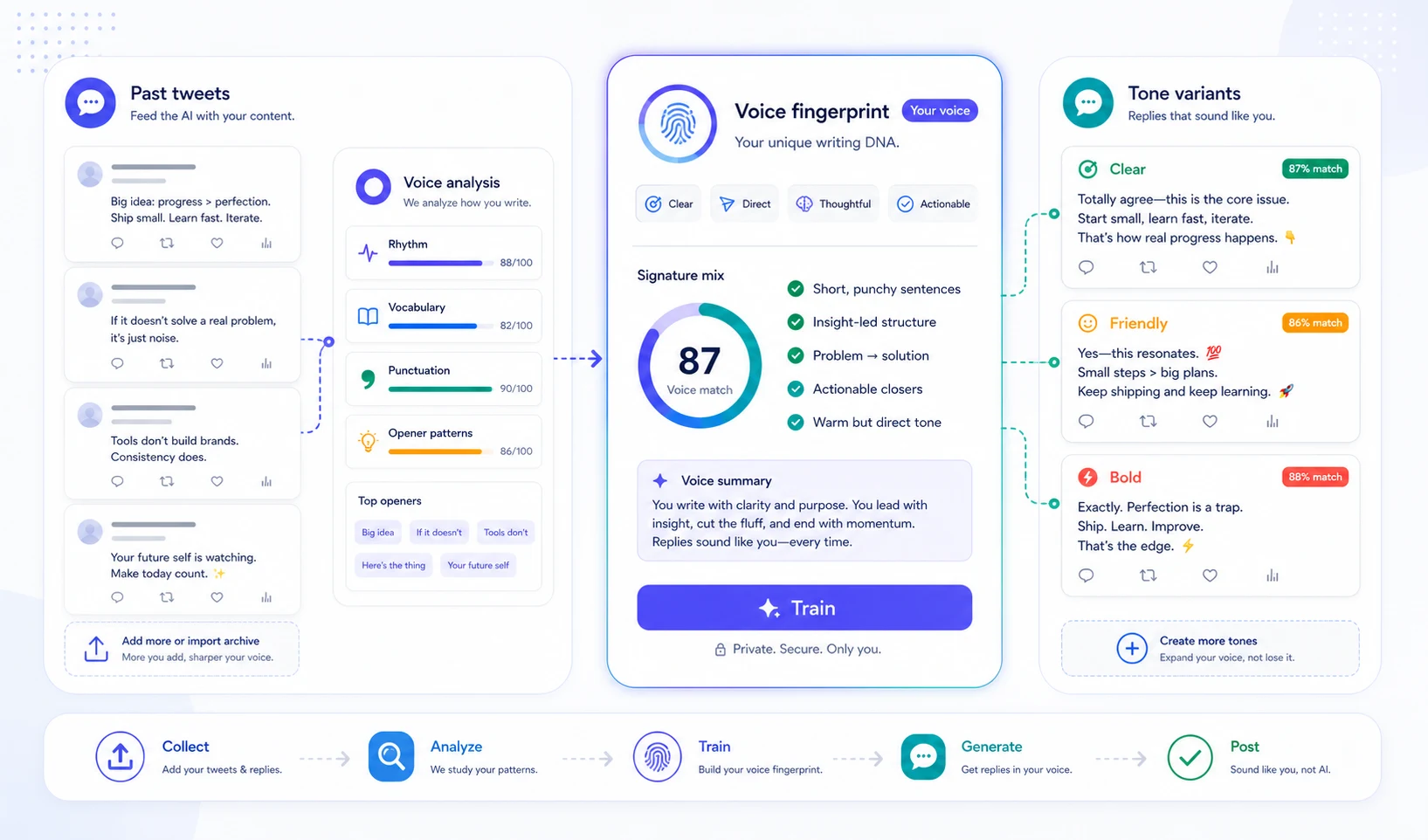
Persona Studio is the fix. You give it a batch of your own past tweets — 10 is enough to start, 25–50 is the sweet spot — and it learns a compact "voice fingerprint" — sentence rhythm, opener patterns, vocab habits, punctuation tics. From that point on, every paid surface in XposterAI (the extension's reply button, the 3-tone variants, the free LLM tools) sounds like you, not like a model.
This post explains what the feature is, how to set it up, and where it shows up in the product.
If you want the writing workflow before the product setup, start with How to Write Better X Replies With AI. Persona Studio improves the voice layer; that guide covers the judgment layer: context, angle, length, and editing.
1. What Persona Studio Actually Trains On
Before training, an XposterAI persona was a declarative bundle: a tone preset ("witty"), a style ("concise"), a language ("en"), and an emoji toggle. Useful, but it only tells the model how generic-witty should feel — not how you sound when you're being witty.
Training adds a second layer. You paste your tweets, the server runs a fingerprint pass over them locally (no LLM, just deterministic Python: average sentence length, opener classification, top non-stopword vocab, em-dash and ellipsis ratios, hashtag density, and so on), and then one short LLM call distills the fingerprint into a 400-character "voice summary." That summary is the only thing the AI reads at generation time — it gets prepended to your prompts as a single instruction line.
So when you click "Generate reply" on the extension, the system prompt now contains two things:
- The declarative instruction ("a 'happy' reply in 1–2 sentences, no emojis…").
- The voice line ("Write in this specific voice: terse declaratives, em-dash heavy, opens with numbers, never hashtags").
The model then writes a happy reply that sounds like your declaratives, not a stock AI happy reply. The two layers compose — they don't fight.
2. The Tone Question, Answered
The most common question once people see this is: "If my persona is trained, do I lose the tone buttons?" No — the opposite.
Before Persona Studio, the extension's mood button (happy / sarcastic / witty / friendly / professional) was a no-op whenever you had a persona selected. The persona's stored tone won, every time. After Persona Studio, the priority flipped: an explicit mood you pick at reply-time overrides the persona's default tone. The trained voice rides on top either way.
What this means in practice:
| You pick | With trained persona | Result |
|---|---|---|
| (nothing) | active | Persona's default tone, your voice |
| Happy | active | Happy mood, your voice |
| Sarcastic | active | Sarcastic mood, your voice |
| Happy | no persona | Happy mood, generic AI voice |
The trained voice is the who. The tone you pick is the how. They're orthogonal.
3. Where The Trained Voice Shows Up
Once you've trained a persona, the voice line is automatically injected on every paid surface:
- Single reply in the Chrome extension (the main reply button).
- 3-tone variants in the extension (all three variants get your voice, even though each variant has a different tone).
- The 8 Tier B free tools on the website — Tone Rewriter, Reply Generator, Reply Audit, Hook Analyzer, Bio Generator, Hashtag Generator, Tweet-to-LinkedIn Converter, Thread Cliffhanger Generator. Each tool's form now shows an "Apply my voice" checkbox for paid users with a trained persona.
- Scheduler Studio — the calendar composer's AI drafts (up to 10 at a time) are written in your trained voice, and 🎙 Ramble turns up to five minutes of talking into posts or a thread that sound like you.
The free tools handle this with a strict server check: the checkbox only activates voice injection if your account is paid and has a trained persona row. Tampering with the form (browser devtools, scripted POST) cannot unlock it — the server re-verifies before reading the voice summary.
Anonymous and free-tier users on the tools see a small "Apply your own voice →" link instead of a checkbox. Clicking it leads to the dashboard so they can see what they're upgrading toward.
4. One Persona Per Language
Voice fingerprints are language-specific. A Spanish tweet's rhythm, vocabulary frequency, and punctuation tics are fundamentally different from an English one — you cannot train a "universal voice" that captures both. The math doesn't work, and the prompt model doesn't work either: a Spanish voice fingerprint applied to an English prompt produces awkward Spanglish.
So Persona Studio treats each language as its own persona row. If you reply in English most of the time but occasionally write in Spanish, you train two personas:
My EN Persona— language: en, voice: your English fingerprintMy ES Persona— language: es, voice: your Spanish fingerprint
You switch between them from the same dropdown in the extension popup that you've always used. The dashboard's Persona Studio page has a matching switcher when you own more than one persona.
The English persona is the default starter. When you visit the dashboard for the first time, you'll see a one-click "Create my EN Persona" button — that gives you a baseline (English, neutral tone, no emojis) ready to be trained. Adding more language personas is done from the extension popup the same way it always has been.
5. The Dashboard Workflow
The new page at /dashboard/persona has four tabs:
Train. Paste tweets (one per line, or separated by ---), or upload a Twitter archive zip. Archive parsing happens entirely in your browser — the tweets only leave your machine when you click "Train my voice." 25–50 representative tweets is the sweet spot the AI reads when distilling your voice; more still sharpens the statistical fingerprint, and even 10 gets you a usable first pass.
Voice Summary. The 400-character distillation. Editable. Trust beats accuracy here — if the auto-generated summary says "writes terse declaratives" but you know you also drop the period on closers, just type that in. The model reads what you save, so manual tweaks land directly in every future reply.
Fingerprint. A read-only view of the derived stats: average sentence length, median tweet length, opener distribution (Question / Number / Declarative), punctuation tics, hashtag/emoji/URL densities, and your top 30 non-stopword vocab. Useful as a sanity check ("yeah, em-dash density 0.42 sounds about right for me").
Test it. A small sandbox that lets you paste a tweet, pick a mood, and generate a sample reply with your active persona — without leaving the page. Uses one reply credit per click, same as the extension.
6. What's Stored And What Isn't
Three pieces of state per trained persona:
training_text— your raw tweets, joined with---, capped at 50 KB. Stored so you can re-train or audit later. Never sent in any LLM prompt.fingerprint_json— the derived stats. Stored so the dashboard can render charts without re-deriving every time.voice_summary— the ≤ 800-character prose blob. The only thing the LLM reads.
Why this split matters: your training tweets never travel in the prompt. The fingerprint summary is short, intentional, and reviewable. If you ever want to know what the AI has been told to mimic, open the dashboard and read the summary — that's the whole instruction.
7. The Limits
A few practical caps worth knowing:
- Training is paid-only. Free tier can still have one declarative persona (tone preset, style, language, emoji toggle) and the extension's default English baseline works without any account. But training itself requires Monthly Pro or Annual Pro. Free users who hit the train endpoint get a clean 402 response — no OpenAI credits spent, no partial state written.
- One trained persona per user at launch. The schema supports many, and the dashboard switcher already lets you pick between multiple personas. But for the keystone launch, only one row's
voice_summaryshould be populated at a time. Agency-tier multi-trained personas is a later milestone. training_textcapped at 50 KB. Roughly 200–400 tweets fit comfortably. If your paste is bigger, the row is truncated transparently and the fingerprint runs on the full submission. The truncation only affects what's stored, not what's analyzed.- The voice summary is short on purpose. 400 characters forces the distillation to capture signature habits, not a long encyclopedia of edge cases. Shorter prompt instructions also produce better mimicry — long lists of rules tend to fight each other in the model's attention.
8. A Realistic First Session
If you want to try it end-to-end in 10 minutes:
- Go to your X profile, scroll back, copy 100 of your replies (skip the ones that are just
@handle thanks!— they're not signal). Or download the full archive zip from X's data export. - Visit
/dashboard/persona. Click "Create my EN Persona" if you don't have one yet. - On the Train tab, paste or upload, click "Train my voice." Takes 5–10 seconds.
- Reload. Switch to the Voice Summary tab. Read what the system thinks you sound like. Edit one or two specifics ("never uses three-dot ellipses", "always opens with a number when threading") if the summary missed them.
- Switch to Test it. Paste a tweet you'd normally reply to. Pick "casual" mood. Generate. Compare it to a reply without the persona by toggling personas in the extension popup.
The difference should be obvious within 2–3 generations. If it isn't, the training tweets were probably too sparse or too uniform — try adding 50 more from a different topic.
9. What This Unlocks
Persona Studio is the keystone for a longer roadmap. Once your voice lives in the system, it can ride on top of every new paid surface without re-asking — and that's already happening: Scheduler Studio's thread composer and scheduled posts shipped since this was written, with your trained voice running through them from day one. The hard part — getting the voice in — is one-time work.
For now, the immediate payoff is the one most people will feel first: your AI-assisted replies stop sounding like AI-assisted replies. They sound like the same person who wrote the original tweet you sent before you ever installed an extension.
If you've been holding off on automation because of the "AI tells" — the predictable cadence, the hedging, the over-formality — that's the wall this feature is built to break.
Where To Start
Head to /dashboard/persona, paste your tweets, train. The rest of the product picks it up automatically.
If you're new to XposterAI, the extension guide is the right starting point: How to Use the XposterAI Chrome Extension.
And the earlier write-up on persona profiles and reply variants gives the foundation Persona Studio is built on: New XposterAI Features: Personas, Reply Variants, Credits, and Referrals.