XposterAI has been getting a set of practical upgrades focused on one goal: helping you reply faster on X without losing your own voice.
The newest features make the workflow more personal, more flexible, and easier to track. You can now save reusable persona profiles, generate multiple reply options at once, see how your credits are being used, and share XposterAI with a referral link that rewards both sides.
Here is what changed and how to use it.
1. Persona Profiles
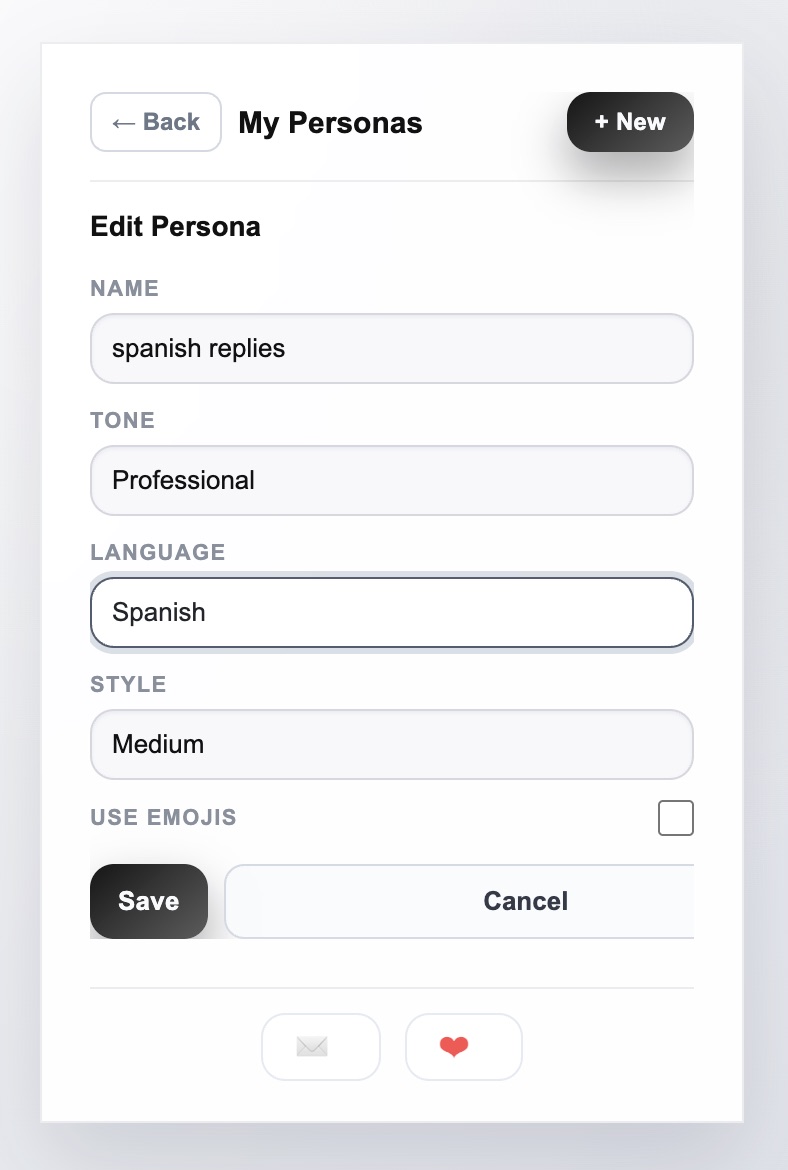
Persona profiles let you save the voice and reply preferences you want XposterAI to use. Instead of choosing the same tone and style every time, you can create a profile once and reuse it whenever you generate replies.
This is useful if you reply in different contexts. A founder may want one persona for direct product feedback, another for friendly creator conversations, and another for concise professional replies.
What You Can Set
A persona can include:
- Name: A label you recognize quickly.
- Tone: The overall feel of the reply.
- Style: How detailed, casual, or direct the reply should be.
- Language: The language the reply should use.
- Emoji preference: Whether replies should include emojis naturally or avoid them.
- Default persona: The profile you want to use most often.
How to Use It
Start by creating one persona that sounds closest to how you normally write. Keep it simple. A good first profile might be:
- Name: Founder voice
- Tone: Professional
- Style: Medium length, useful, direct
- Language: English
- Emojis: Off
Once that feels right, create more specific profiles for different situations. For example, you can keep one persona for customer replies, one for networking, and one for casual creator conversations.
The main benefit is consistency. Your replies should feel like they came from the same person, not from a different writing style every time.
New: Train the Persona on Your Own Voice
Persona Profiles started as a declarative bundle — tone, style, language, emojis. We have since shipped Persona Studio, which adds a second layer: the persona learns how you specifically write.
You paste 100–200 of your past tweets (or upload your X archive), the server extracts a compact "voice fingerprint" (sentence rhythm, opener patterns, vocab habits, punctuation tics), and a short voice summary gets prepended to every reply prompt going forward. The result is that even the tone presets — witty, professional, casual — produce replies in your cadence instead of generic AI cadence.
Training lives at /dashboard/persona and is available on paid plans. Once trained, the voice flows automatically into the extension's reply button, the 3-tone variants below, and the LLM-backed free tools on the website. One persona per language, so train English first, then Spanish or Dutch or whatever else you reply in.
Full walkthrough: Persona Studio: Train Your Voice Into XposterAI.
2. 3-Tone Reply Variants
Sometimes the first AI reply is not the one you want. The idea may be good, but the angle may be too flat, too formal, or not sharp enough.
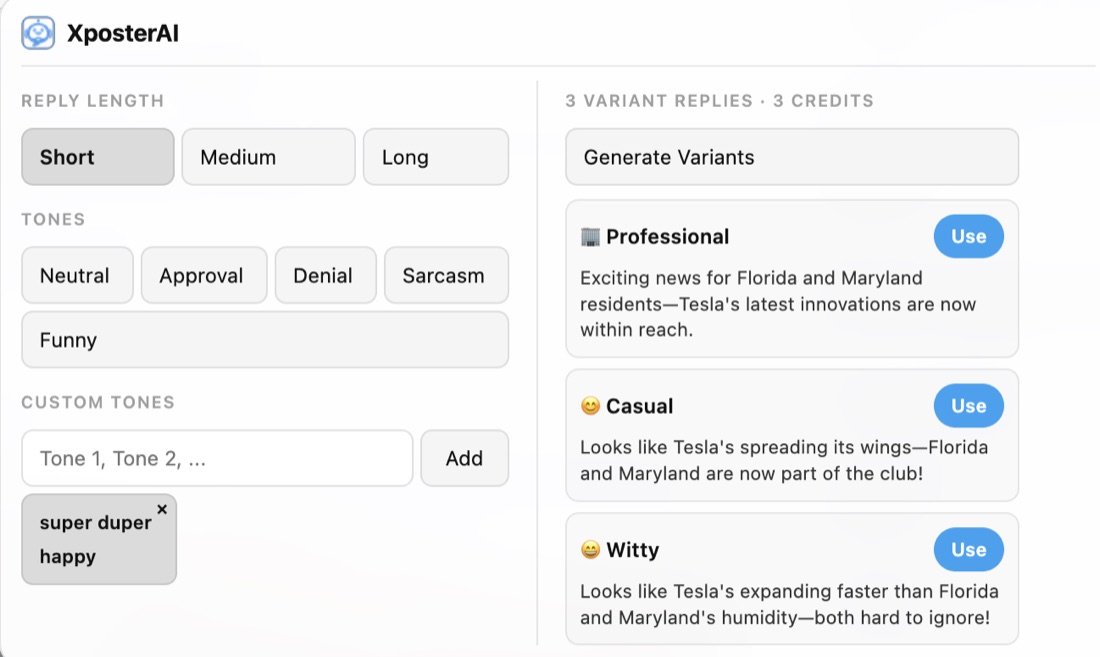
The new reply variants feature gives you three different reply options in one request. Instead of generating again and again, you can compare multiple angles quickly and choose the one that fits the conversation.
How the Variants Help
The three options are designed to give you different directions, such as:
- A more supportive reply
- A more direct or tactical reply
- A more conversational or playful reply
This makes it easier to match the moment. If someone shares a launch, you may want the supportive version. If someone asks a tactical question, the direct version may be better. If the conversation is casual, the lighter version may fit.
How to Use It
Use variants when the reply matters more than speed. For example:
- Replying to a larger account in your niche
- Joining an active thread with strong visibility
- Responding to a potential customer
- Choosing the right tone for a sensitive topic
Read all three options before posting. Pick the strongest one, then edit it lightly so it sounds natural. The best workflow is not "generate and paste." It is "generate, choose, polish, post."
Reply variants use more credits than a single reply because they generate multiple options at once, so use them when the extra choice is worth it.
For a practical editing workflow after the variants are generated, read How to Write Better X Replies With AI. The important step is still choosing the strongest angle and polishing it before posting.
3. Personas Now Work With Reply Variants
The most useful part of the update is that persona settings now apply to reply variants too.
That means you can generate three different options while still keeping your saved language, style, and emoji preferences. You get variety without losing consistency.
For example, if your default persona avoids emojis and uses a concise founder voice, the three variants will still follow that preference. They will differ in angle and tone, but they will stay inside your chosen writing style.
Best Way to Use This
Create a default persona first. Then use variants when you want options.
That order matters. If the persona is dialed in, the variants become much more useful because you are choosing between good options that already sound closer to you.
If the output feels too formal or too casual, adjust the persona rather than editing every reply from scratch.
4. Credit Usage Tracking
The account dashboard now gives you a clearer view of credit usage. This helps you understand how much you are using XposterAI and when you may need to upgrade or slow down.
The dashboard shows remaining credits and a usage chart so you can see your activity over time.
How to Use It
Check the dashboard after a few sessions of active replying. Look for patterns:
- Are you using most credits on one or two heavy engagement days?
- Are variants taking a larger share of usage?
- Are you running out before the end of the month?
- Are you barely using your available credits?
This helps you choose a better workflow. If you are replying casually, single replies may be enough most of the time. If you are doing serious audience growth work, variants may be worth using on high-value conversations.
Credit tracking also gives you a better sense of ROI. If a few focused reply sessions lead to more profile visits, conversations, or followers, that usage is probably doing its job.
5. Referral Links and Bonus Credits
XposterAI now includes referral links in the account dashboard. When a friend signs up through your link, both of you can receive bonus credits.
This is meant to make sharing simple. If someone asks what you use to reply faster on X, you can send your referral link directly instead of explaining the whole workflow from scratch.
How to Use It
Go to your account dashboard and copy your referral link. Share it with people who would actually benefit from the product:
- Founders building on X
- Indie hackers doing product marketing
- Creators who reply often
- Community managers handling active conversations
- Agencies managing multiple accounts
The best referral is contextual. Instead of posting a generic link, explain how you use XposterAI. For example, you might say that you use personas for voice consistency and variants when you want to choose the best reply angle.
A Simple Workflow Using All the New Features
Here is a practical way to combine everything:
- Create a default persona that matches your normal writing style.
- Use single replies for fast, everyday engagement.
- Use 3-tone variants for high-value conversations.
- Edit the selected reply before posting.
- Check the credit chart weekly to understand your usage.
- Share your referral link with people who ask about your workflow.
This keeps the system simple. Personas handle consistency, variants handle choice, the dashboard handles visibility, and referrals help you earn extra credits when you share the product.
If you are new to the extension workflow, start with this guide: How to Use the XposterAI Chrome Extension.
The Bottom Line
These updates are not about adding complexity. They are about making XposterAI easier to fit into your real posting routine.
Use personas when you want consistent voice. Use variants when you want better options. Use the dashboard when you want to understand your usage. Use referrals when someone else could benefit from the same workflow.
Together, they make XposterAI feel less like a one-off reply generator and more like a lightweight engagement system for growing on X.