"Fake tweet generator" sounds like a tool for mischief. In practice, the people who need one are mostly designers, marketers, teachers and meme-makers who need a tweet-shaped image without posting a tweet. We built a free one, so this post is both the introduction and the honest user manual.
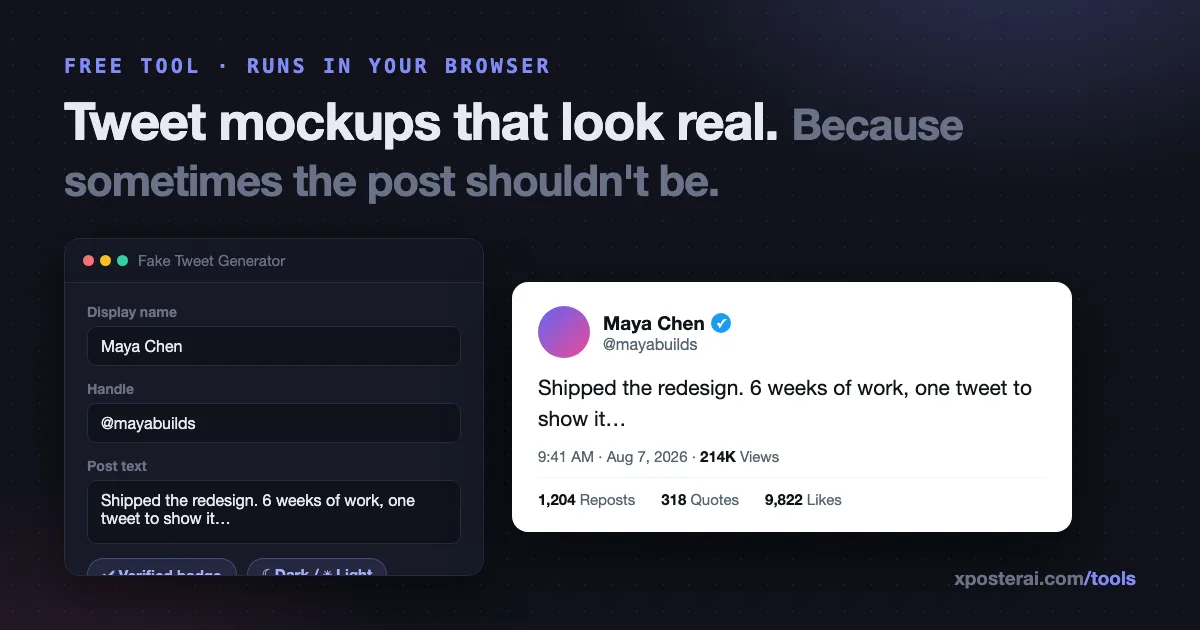
The short version: the Fake Tweet Generator renders a pixel-realistic X post from whatever you type — display name, handle, avatar, verified badge, timestamp, likes, reposts, views — in light or dark theme, and downloads it as a clean PNG. No watermark, no signup, and it runs entirely in your browser: nothing you type is uploaded anywhere.
What people actually use tweet mockups for
- Product marketing — a "what customers say" visual for a landing page, built from a real quote you have permission to use. (Related: our testimonial post generator writes the copy side.)
- Ad creative — tweet-shaped ads consistently read as native content. Agencies mock these up daily.
- Content previews — see how a draft will look as an image before you post it. Our tweet preview generator shares the same rendering engine and is tuned for exactly this.
- Teaching and reporting — a media-literacy class showing how easily a screenshot can be fabricated (that's the whole lesson, really), or a news layout that needs a placeholder post.
- Memes and hypotheticals — the "nobody:" genre, imaginary conversations, obviously-satirical formats.
What it looks like
Every element is editable: avatar image, name, handle, badge on/off, the post text with correct line-break rendering, the timestamp line, and the metrics row. Toggle between light and dark to match wherever the image will live. Then download the PNG — sized for crisp embedding in decks, docs and posts.
There's no watermark because watermarked mockups are useless in client work. That puts more responsibility on you, which brings us to:
The line: mockups yes, deception no
A fake tweet that stays a mockup is a design asset. A fake tweet passed off as a real screenshot of a real person is defamation with extra steps — and on X it also collides with the platform's rules on impersonation and manipulated media.
Our rules of thumb:
- Real person + words they never said + presented as real = never. Not as a joke you'll explain later. Screenshots outrun corrections every time.
- Satire needs to be legible as satire. If a reasonable person could believe it's real, label it or don't ship it.
- Testimonials need permission. A real customer quote in a tweet-shaped frame is fine — with their OK on the framing.
- When in doubt, use an invented persona. Fictional name, fictional handle, generated avatar. The mockup works just as well.
We wrote more about how X treats stolen and misleading content in what X hates most: stolen content and demonetization — the same logic applies to fabricated screenshots.
Mockup vs. screenshot vs. embed: which do you need?
| You want to… | Use |
|---|---|
| Show a post that doesn't exist yet | Fake tweet generator |
| Preview your own draft before posting | Tweet preview generator |
| Share someone's real post with credit | Source link extractor — reposts with attribution baked in |
| Check how your link will render as a card | X card validator |
That middle row matters: if the post is real, don't screenshot it — repost it with the credit intact. The original creator gets the views, and you're not the account that posts context-free screenshots.
Try it
Open the Fake Tweet Generator, type anything, toggle dark mode, download the PNG. Free, no signup — and if what you're actually making is content for a real account, the Scheduler Studio will happily take the real version off your hands.