Spotify figured out something a decade ago: people love a mirror. Give someone their own year in numbers and they'll not only look — they'll post it. X has never shipped a Wrapped. But it has shipped something better, to every user who asks: the archive. Every post, reply, like, DM and setting you've ever touched, in one zip file.
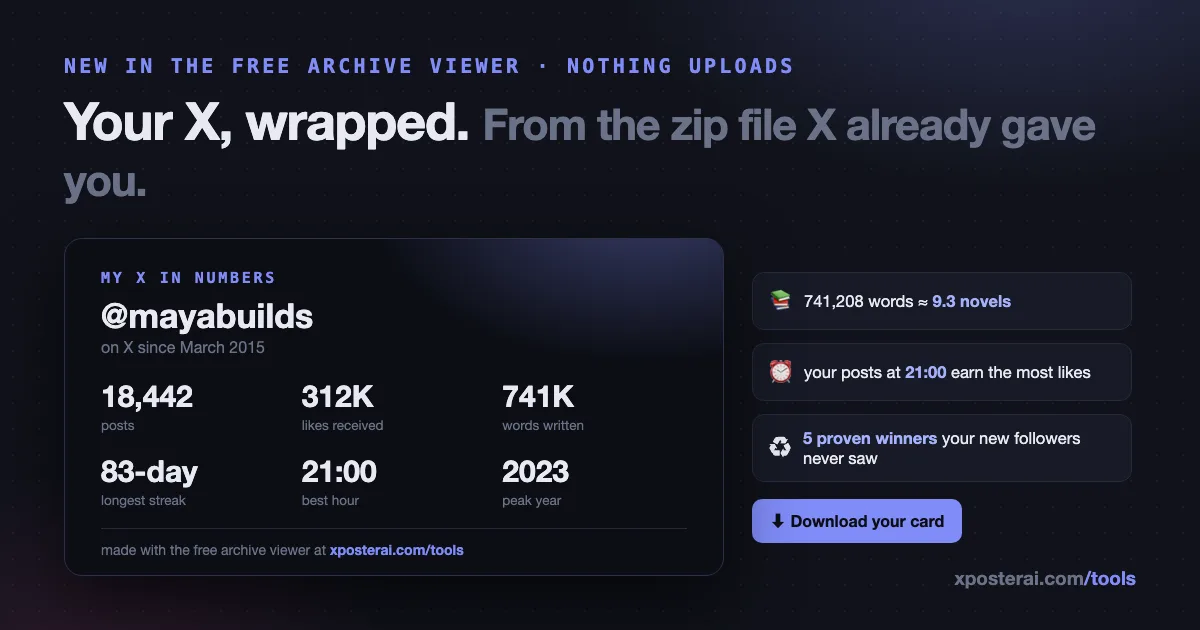
So I built the Wrapped on top of it. This week our free Twitter Archive Viewer got a ✨ Highlights tab: load your archive and the first thing you see is your whole X life, amalgamated into numbers you'll want to screenshot.
What your Highlights show
- Years on X — from your actual join date, with your posting span
- Total words written — measured in novels (a novel is ~80,000 words; long-time posters, brace yourselves)
- Your longest daily-posting streak — and your longest quiet spell
- Likes given vs. likes received — your karma balance
- Your peak year — by average engagement, not raw volume
- Your real best hour to post — engagement-weighted from your own history, with an hour-by-hour chart (a single lucky 3am banger can't win; hours need at least 5 posts to qualify)
- Proven winners worth reviving — your best posts from 6+ months ago, which most of your current followers have never seen
- The fun cross-references — your most-replied-to friend, your busiest DM thread, how many posts you deleted, and what X's ad machine has filed about you (interest count + advertisers who targeted you)
And then the part built for posting: a downloadable stats card — your handle, join date, and six big numbers on a clean dark card sized for X's feed. One click, PNG, no watermark requirements, post it or don't.
The privacy part (it's the whole design)
Everything runs in your browser tab. The zip is parsed locally, the stats are computed locally, the card is drawn locally on a canvas. Nothing is uploaded — not one tweet, not one DM, nothing. That's not a setting; the tool has no server side to send things to. Your archive contains your private messages, so this was the only acceptable architecture.
Same deal as the rest of the viewer, which also shows every dataset in the zip — DMs, Grok chats, deleted posts, login history, the ad-interest file.
How to get yours
- Request your archive: X → Settings → Your account → Download an archive of your data. X takes a day or so to prepare it.
- Open the Archive Viewer and load the zip — or the unzipped folder, which is also the only way to see your photos and videos inline.
- You land on ✨ Highlights. Screenshot freely; download the card.
Already have an old archive rotting in your Downloads folder? It works on that too — the numbers just stop at whenever you exported it.
What I do with the "proven winners" list
The Highlights tab surfaces your best posts older than six months for a reason: they already worked, and your follower count has probably changed a lot since. Each one has a ♻ Revive button that reopens it in Scheduler Studio — repost as-is, or let the Evergreen library recycle it as a fresh rewrite. If you'd rather plan that by hand, the evergreen repost planner is the free version of the same idea.
Same story for your best hour: the chart shows you when your audience actually engaged, which beats any generic best-time chart — including ours. The Studio learns this continuously from live engagement; the Highlights tab computes it once from your history. Both beat guessing.
Post your card
If you download your card and share it, I'd genuinely love to see it — I'm @XposterAI. The whole thing is free, no signup, and your archive never leaves your machine: xposterai.com/tools/twitter-archive-viewer.