Every "best free tools" list has the same problem: it's a list of tools somebody thinks you should use.
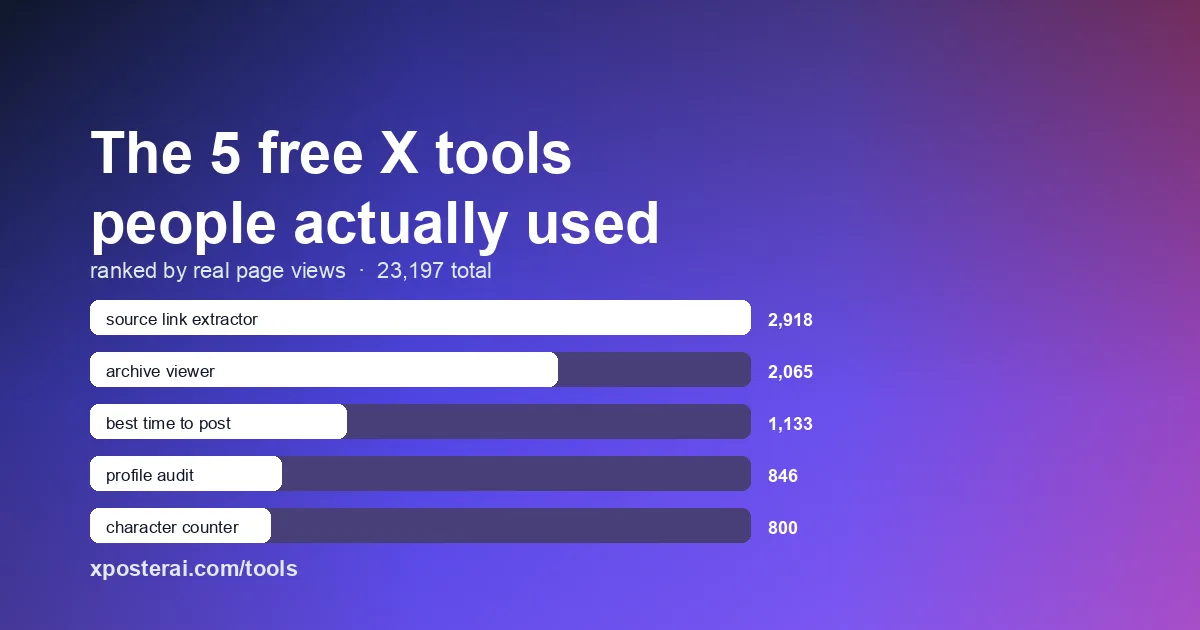
We have 56 free tools on this site, and every page view gets counted. So instead of guessing, here is the ranking that came out of the database — the five tools people actually opened, in order, out of 23,197 total tool views.
Two of them are not what we expected. One of them tells you something useful about how creators actually work.
1. Tweet Source Link Extractor — 2,918 views
The most-used tool on the site, by a comfortable margin, does one small thing: it pulls the original source link out of a tweet so you can repost with credit instead of a t.co redirect nobody can read.
That it ranks first says something. This isn't a workflow tool or a strategy tool. It's a tool for a specific moment — you found something worth resharing, and you want the link to point somewhere real.
2. Twitter / X Archive Viewer — 2,065 views
Second place, and the one that surprised us most.
If you've ever requested your X data export, you know what arrives: a zip full of JavaScript files that no normal program will open. This tool opens it in your browser so you can actually read your own posts, search them, and find the thing you wrote three years ago.
Nothing is uploaded anywhere — the archive is parsed locally in the tab. That matters when the file contains every DM you've ever sent.
3. Best Time to Post on X — 1,133 views
The first tool on this list that people come back to rather than use once.
It converts posting windows into your timezone, which is the part most advice gets wrong. "Post at 9am" is useless if the article was written for someone six hours away from your audience.
4. X Profile Audit Checklist — 846 views
Scores your profile against the things that actually decide whether a visitor follows you — the bio, the pinned post, whether your header explains anything.
This one ranks where it does because profile work is bursty. Nobody audits their profile weekly. They audit it once, after noticing that plenty of people visit and almost nobody follows.
5. Twitter / X Character Counter — 800 views
The most boring tool in the top five, and the one that will still be here in five years.
It counts characters the way X counts them, which is not the same as the way your text editor counts them — links resolve to a fixed length, and emoji and CJK characters do not cost one each.
What the ranking actually says
Look at the top two. Extracting a source link and opening an archive are both one-off jobs. You don't do them on a schedule. You hit a specific wall, you need it gone in the next two minutes, and you want to close the tab afterwards.
Positions three through five are the opposite — timing, profile, character count are all things you touch repeatedly.
So the list splits cleanly in half, and the one-off tools win. That's worth knowing if you build things: the tool that solves an annoying, infrequent, urgent problem gets opened more than the tool that improves your routine, because a routine is something people are already coping with.
The other thing all five have in common: none of them ask you to sign up. No account, no email, no "continue with Google." That was a deliberate choice, and given that these five alone account for roughly a third of all tool traffic, it looks like the right one.
Where this goes next
Free tools solve single steps. If you find yourself doing several of these in sequence — writing the post, checking it fits, previewing it, then posting it to four networks by hand — that's the point where Scheduler Studio is worth a look. You can write a post, have the AI draft one in a voice trained on your own writing, and preview it on every network before connecting any account.
And if you'd rather just keep using the free tools, that's genuinely fine. They're not a trial and they don't expire.